Dual-Arm Franka#
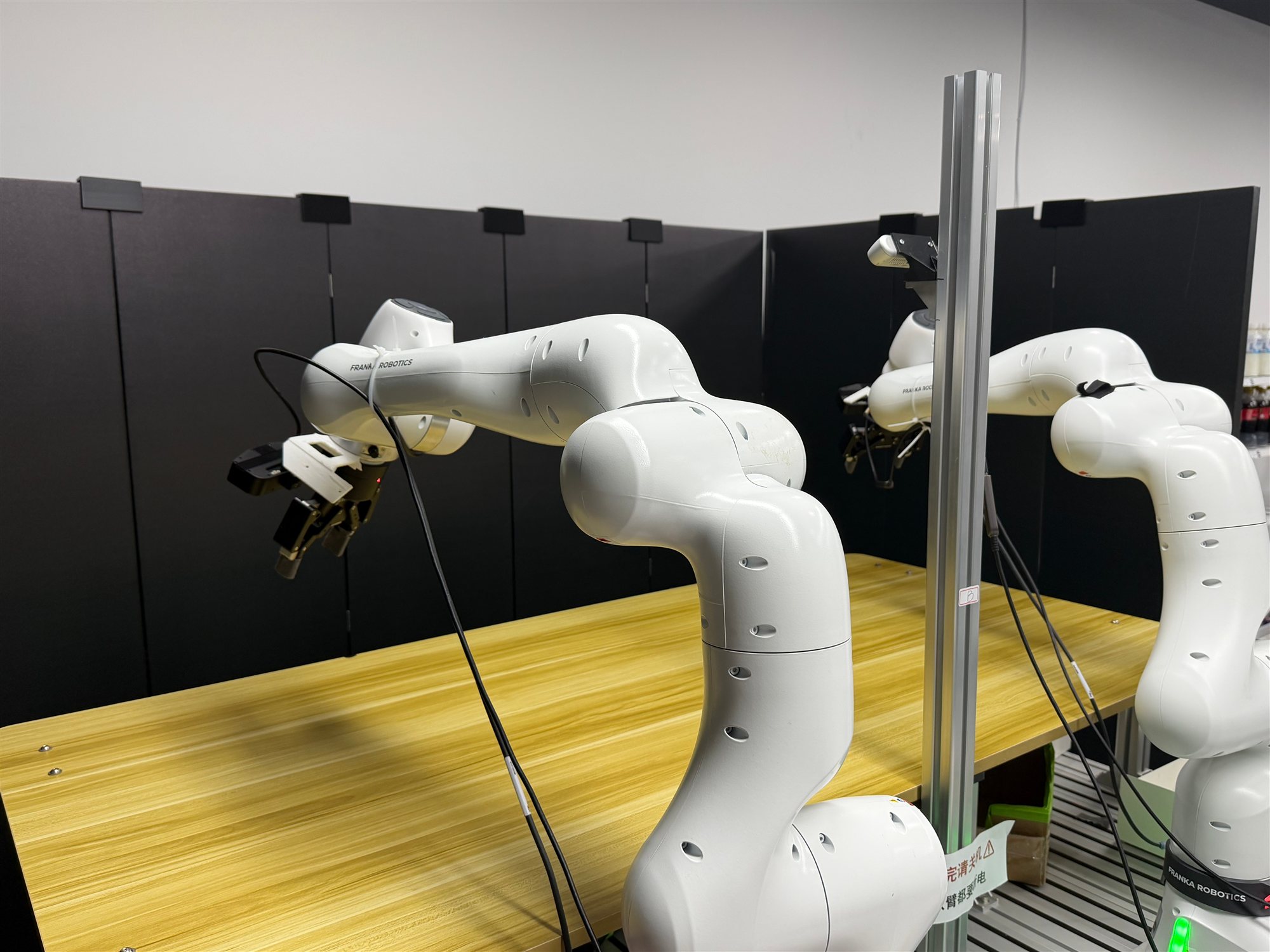
Dual-Franka system for real-world experiments.#
RPent can control a two-node dual-Franka setup through an RLinf
RealWorldEnv worker. Watch the task demos.
Install#
Install libfranka 0.19.0 first by following the official quick-install guide.
Clone RPent and install its Python dependencies. If you already have the
checkout, enter it and run uv sync:
git clone https://github.com/RLinf/RPent.git
cd RPent
uv sync --extra franka --extra sam3
This installs RLinf release/v0.4, rpent-openpi, SAM3, and Franka
camera, gripper, and teleoperation dependencies into .venv. The included
franky-control wheel bundles libfranka 0.19.0.
Calibration#
Both base_camera and d455_camera must be calibrated against the
right-arm base. Use calibration_tools/ or ROS
easy_handeye; both export YAML.
Wrist cameras are observation-only in the default configuration. To use a
wrist RGBD camera for projection, configure its calibration and projection view
as described below.
The tools support D435 and have been validated with a D435 setup. Other models
and stream configurations are unverified and may require more than parameter
changes. Zero distortion coefficients are accepted; nonzero coefficients are
supported only for distortion.brown_conrady. Other nonzero models are
rejected with their model and coefficients, without automatic conversion or
ignoring distortion.
1. Prepare the environment
On the camera node, activate the existing RLinf Franka environment and check the required interfaces from the RPent repository root:
source /absolute/path/to/franka-env/bin/activate
cd /absolute/path/to/RPent
PYTHONPATH=calibration_tools python -c "import numpy, scipy, yaml, pyrealsense2; from common import check_opencv; check_opencv()"
This checks ChArUco, PnP, calibrateHandEye, and the required method constants.
If dependencies are missing, create a separate calibration environment:
python3 -m venv .venv-calibration
source .venv-calibration/bin/activate
pip install -r calibration_tools/requirements.txt pyrealsense2
On the right-arm control node, compile the reader against the libfranka development library matching the robot firmware:
cmake -S calibration_tools -B calibration_tools/build \
  -DCMAKE_PREFIX_PATH=/absolute/path/to/libfranka/install
cmake --build calibration_tools/build --parallel
The executable calibration_tools/build/read_franka_state uses readOnce()
to output end-effector poses, joint velocities, and robot status as JSON. It
sends no motion commands. Installing Python control packages does not guarantee
the headers and CMake configuration needed to build this reader.
Replace the camera serials, SSH alias, absolute reader path, and robot IP below.
Omit --ssh-host for a local reader; add --library-dir /path/to/lib when
its shared libraries need an explicit search path.
2. Start the camera and collect samples
Close programs using the cameras, then start the service:
python calibration_tools/raw_camera_service.py \
  --base-serial BASE_SERIAL --d455-serial D455_SERIAL
Attach the ChArUco board rigidly to the right end effector and keep the camera
stationary. Defaults are 6×8 squares, 25 mm square length, 18 mm marker length,
DICT_4X4_100, and a non-legacy layout. Configure other boards with
--squares-x, --squares-y, --square-m, --marker-m, and
--dictionary; lengths are in meters.
In another terminal on the same camera node, activate the chosen environment:
python calibration_tools/base_handeye_collect.py \
  --arm right --camera-serial BASE_SERIAL \
  --camera-url http://127.0.0.1:8765/raw/base \
  --ssh-host robot-right \
  --reader /absolute/path/to/read_franka_state --robot-ip ROBOT_IP \
  --output calibration_tools/sessions/base-to-right
Open http://127.0.0.1:8767. Move the right arm manually, release the guidance
button, wait until stationary, and click Capture pose. Collect 20–30 distinct
poses with rotations about multiple axes; fitting requires at least ten.
The tool only reads state. Without --output, sessions are saved under the
script directory’s calibration_tools/sessions/, regardless of the working
directory.
Stop the collector with Ctrl+C. For D455, repeat with D455_SERIAL,
/raw/d455, and calibration_tools/sessions/d455-to-right. Use a new
directory for each session; D455 stream compatibility must be checked against
the supported distortion models above.
3. Fit and export
python calibration_tools/solve_base_handeye.py \
  calibration_tools/sessions/base-to-right --arm right
python calibration_tools/export_dual_franka.py \
  calibration_tools/sessions/base-to-right/base_camera_extrinsic_candidate.json \
  --output calibration_tools/exports/base_to_right.yaml
For D455, use d455-to-right and d455_to_right.yaml instead. Inspect
quality_report.json and validate the candidate against independent physical
measurements. Successful fitting or YAML export does not establish accuracy.
Export does not overwrite existing files.
4. Configure RPent
List the independently validated YAMLs in your robot configuration:
perception:
  calibration:
    base_camera: /absolute/path/to/base_to_right.yaml
    d455_camera: /absolute/path/to/d455_to_right.yaml
Load this configuration with --robot-config below. Stop the calibration
camera service before starting RPent. Preserve and verify
perception.base_frames and localization bounds; these tools do not calibrate
the relationship between the two arm bases.
Wrist projection is optional. Uncomment the wrist entries under
perception.calibration and perception.projection_views in the example
configuration, and configure RGBD cameras with aligned depth and color intrinsics.
Each wrist calibration YAML needs arm: left or arm: right at the top
level, parameters.eye_on_hand: true, and
parameters.robot_effector_frame: left_ee_O_T_EE or right_ee_O_T_EE.
Its transformation maps camera coordinates into that end-effector frame.
RPent combines it with the selected snapshot’s end-effector pose and, for poses
in left_base, the configured base-frame transform, to produce right_base
points. Snapshot TCP poses must represent O_T_EE and declare their base frame.
The default Lumos observation cameras are not automatically enabled for RGBD
projection; selecting a wrist anchor requires this configuration.
Development Configuration#
Review and edit the checked-in development defaults before enabling motion:
robots/dual_franka/config/example.yamlcontains the machine identity (bothrobot IPs, camera serials/types, gripper connections), workspace geometry (target poses and safety limits), the easy_handeye YAML mapping (see Calibration), and perception localization bounds + base-frame transform. It sets
realtime_config: ignore; useenforceon a PREEMPT_RT kernel to refuse non-real-time operation.
RPent translates this robot-focused schema into the internal two-node RLinf
cluster and environment objects. To use a different file, pass
--robot-config /path/to/robot_config.yaml.
Start the Two-node Ray Cluster#
The two nodes have fixed, different roles (defined in
robots/dual_franka/runtime_config.py):
- Node
0is the Ray head: it runs the dual-Franka environment worker (all cameras, perception, and arm/gripper state), and the left arm’s real-time controller. For the VLA task, the local VLA server also runs here.
- Node
- Node
1is a Ray worker: it runs only the right arm’s real-time controller, with no cameras and no RPent process.
- Node
Warning
Set RLINF_NODE_RANK before starting Ray on each controller node.
Node 0:
export RLINF_NODE_RANK=0
ray stop --force
ray start --head --port=6379 --node-ip-address=HEAD_IP
Node 1:
export RLINF_NODE_RANK=1
ray stop --force
ray start --address=HEAD_IP:6379 --node-ip-address=WORKER_IP
Run a Smoke Test#
Configure the planner and model service using Planner Configuration first.
Task 0 tests small translations, rotations, and gripper actions, one arm at a time:
uv run --extra franka rpent --robot dual_franka --task-id 0 \
  --planner claude_code --model claude-opus-4-8 \
  --robot-config robots/dual_franka/config/example.yaml
RPent starts robots/dual_franka/env_server.py with the current interpreter,
loads the RPent robot config, generates the internal RLinf adapter config,
connects to Ray, waits for healthz, and records the initial state as step
0. Task 0 does not load the VLA.
VLA Grasp Demo#
RPent provides a demo that uses a VLA to grasp objects. Task 1 exposes
vla_right_grasp / vla_handoff / vla_left_place and can start the dual-Franka VLA server locally.
PI05_CHECKPOINT_PATH points to the trained Pi-05 checkpoint, while
DUAL_FRANKA_REPO_ID is the dataset ID used to locate matching normalization
statistics:
export PI05_CHECKPOINT_PATH=/path/to/checkpoints/global_step_N
export DUAL_FRANKA_REPO_ID=org/dual-franka-tcp-rot6d

uv run --extra franka rpent --robot dual_franka --task-id 1 \
  --cuda-device 0 \
  --planner claude_code --model claude-opus-4-8 \
  --robot-config robots/dual_franka/config/example.yaml
The checkpoint must contain:
actor/model_state_dict/full_weights.pt
<DUAL_FRANKA_REPO_ID>/norm_stats.json
Pretrained checkpoint
A ready-made task 1 checkpoint is published on ModelScope:
Brunchlife/pi05-dualfranka-tcp-rot6d-clean-desk-532-delect-76000.
Download it, point PI05_CHECKPOINT_PATH at the downloaded directory, and set
DUAL_FRANKA_REPO_ID to the subdirectory that holds norm_stats.json:
modelscope download \
  --model Brunchlife/pi05-dualfranka-tcp-rot6d-clean-desk-532-delect-76000 \
  --local_dir /path/to/pi05-dualfranka-clean-desk

export PI05_CHECKPOINT_PATH=/path/to/pi05-dualfranka-clean-desk
Warning
This checkpoint is trained only on our in-house test environment (robot poses, cameras, workspace layout, and objects), so it is expected to generalize poorly to a different setup. To deploy on your own rig, collect demonstrations and fine-tune your own checkpoint with RLinf by following the RLinf dual-Franka guide (collect GELLO demos, convert to tcp_rot6d, run SFT, then deploy).
When --vla-endpoint is absent, RPent starts
rpent/robots/components/pi05_vla_server.py and loads
pi05_dualfranka_tcp_rot6d once.
To run the VLA service separately:
uv run --extra franka python -m rpent.robots.components.pi05_vla_server \
  --embodiment dual_franka \
  --model-path /path/to/checkpoints/global_step_N \
  --repo-id org/dual-franka-tcp-rot6d \
  --cuda-device 0 --transport http --host 0.0.0.0 --port 6000
Then pass --vla-endpoint http://VLA_HOST:6000 to rpent. An external
endpoint always takes precedence over local auto-start.
External Environment Server#
To attach RPent to an already-running dual-Franka environment service:
uv run --extra franka rpent --robot dual_franka --task-id 0 \
  --env-endpoint http://ROBOT_HOST:PORT \
  --planner claude_code --model claude-opus-4-8 \
  --robot-config robots/dual_franka/config/example.yaml
Tools and Artifacts#
The extension exposes view_env_state, view_camera_meta, move_delta,
rotate_delta, open_gripper, close_gripper, and vla_right_grasp / vla_handoff / vla_left_place. Each
analytic motion selects exactly one arm, left or right. Mutating tools
capture per-arm state and synchronized left-wrist, base, and right-wrist images
in RPent’s central EnvState.
Safety#
Keep operators at both emergency stops. Validate task 0 with very small
single-arm motions before attempting a grasp. Stop when camera/state results
disagree, when the requested motion is not reached, or when any calibration is
uncertain.
Manual Skill Testing#
Evaluation requires an exclusive terminal (TTY) for operator confirmation,
without --interactive or Dashboard. Exploration supports
--explore --interactive but still requires a terminal; operator feedback
through the Dashboard is not supported. Unsupported option combinations are
rejected before connecting to hardware. Evaluation also exposes
request_operator_verdict and requires a verdict before calling finish.
request_scene_reset is registered only in exploration mode.
The deployment scripts live in robots/dual_franka/. From the repository root:
robots/dual_franka/run_manual_skill.sh --list-primitives
robots/dual_franka/run_manual_skill.sh --schema vla_right_grasp
Use --primitive NAME --params JSON to call a tool. --task-id selects
the task’s configured vla_instruction for named VLA skills; the planner’s
segment prompt is recorded separately. Existing clean-desk tasks retain their
checkpoint’s original training instruction. --robot-config selects the
machine configuration; its perception.calibration mapping points at the
easy_handeye hand-eye YAMLs. Local SAM3 requires the sam3 extra; a remote
SAM3 service can be attached with --sam3-endpoint.
Robot Codex Profile Isolation#
The deployment wrappers select RPENT_CODEX_HOME (default:
.codex-rpent-live inside the checkout), not the coding shell’s
CODEX_HOME. Memory defaults to its memory subdirectory and the Codex
state database uses the dedicated directory too. Create a private config.toml
there if needed; do not overwrite existing private settings.
For API deployments, explicitly set RPENT_CODEX_API_KEY and optionally
RPENT_CODEX_BASE_URL. The wrappers clear inherited CODEX_API_KEY,
CODEX_BASE_URL, OPENAI_API_KEY and OPENAI_BASE_URL. Otherwise,
authenticate separately in the dedicated profile. File-based credential storage
can be configured; check private configurations for shared OS keychain use.
Never commit credentials, private configuration or session records.
RPENT_CODEX_MODEL, RPENT_REASONING_EFFORT and
RPENT_CODEX_SERVICE_TIER default to gpt-5.5, medium and fast.
These isolation rules apply to the deployment wrappers, not the generic RPent
CLI. Prefer invoking a wrapper: sourcing its environment script directly changes
the current shell’s environment.
Directory isolation is not a security sandbox or workspace-file isolation. The planner explicitly uses no interactive approvals and full filesystem access. Editing private configuration does not override the planner’s explicit permissions. The connectivity probe remains read-only.
Attended Exploration#
dual_franka --explore waits for operator scene confirmation before robot
reset and records human verdicts with observation evidence. It reuses
RPent’s exploration sessions and layered memory while retaining the existing
real-robot RGB/depth/state logs. This does not enable single-arm franka
exploration.
Robots opt into human-interactive exploration through
RobotSpec.supports_human_interactive_exploration. The five operator commands
appear in interactive help only when this capability is active in exploration mode.
rpent --robot dual_franka --task-id 0 --explore --interactive \
  --robot-config /path/to/robot.yaml \
  --memory-dir /path/to/memory/dual_franka \
  --explore-attempts-per-session 3 --explore-sessions 2 \
  --output-dir /path/to/new-run
Configure the planner and task-1 VLA as described above. The client skips its
usual reset-on-connect during exploration; underlying hardware initialization
still follows RLinf’s own lifecycle. Every session must call
request_scene_reset before motion. The operator restores the physical scene
and replies done; only a successful robot reset with camera/state capture
starts an attempt. Reset failures keep motion blocked.
request_operator_verdict records a fresh observation and asks for
success, failure, continue or abort, with optional notes.
solved() uses the current operator verdict. Motion and continue clear
previous verdicts. Abort/EOF permits ending without spending the remaining
attempt budget.
With --interactive, reply using /operator <request-id> <answer> as shown
in the terminal; other lines remain planner steering. Without it, answer the
terminal prompt directly. A TTY is required. Dashboard operator feedback is not
implemented, so Dashboard exploration is rejected before runtime startup.
Each sessions/session_<NNN>/ retains state and camera artifacts, per-step
exploration.json and session-level operator_events.json. Failed attempts
remain in the trace. Memory reads use task-family and global; working notes go
into the task inbox’s wip/. After success, draft task-family/global lessons in the
inbox; the runner exports the winning attempt’s command sequence and adds
operator evidence to its task audit. Recorded coordinates are not automatically
replayed. --auto-merge-memory is opt-in and invokes the existing memory
merge/index workflow only on successful, error-free exploration runs, including
the task-specific audit/recipe pair.
Prompts are selected by robots/dual_franka/prompt_bundle.py. Evaluation uses
prompts/system.py and prompts/user.py; exploration uses
prompts/explore.py. tasks.py owns task instructions, success criteria and
constraints; robot_spec.py supplies the rendering variables. Continuation
system prompts retain the task context. The LIBERO exploration prompt
lives in robots/libero/prompts/explore.py; its simulator reset/termination
assumptions are not inherited by the real robot.
External --env-endpoint servers must advertise explicit_reset_only=True.
Servers without this capability are rejected before client reset so motion
starts only after operator confirmation. Validate physical reset convergence,
camera freshness, and task judgment on the deployed robot.
Direct Interactive Verdicts#
With dual_franka --explore --interactive, submit /success or /failure
on its own to finish exploration through program control. Bare success and
failure remain ordinary planner messages. Success requires a confirmed attempt;
failure can also end the run before the initial reset. The first terminal verdict wins.
The command never reaches the planner as chat. New tool calls are refused and
active work is cancelled at its next supported boundary; an outstanding robot
RPC or inference must return before finalization. A fresh observation backs the
operator verdict. With /success, the successful recipe/audit pair is published through the
existing memory merger to task-specific before exit, even without
--auto-merge-memory. With /failure, failure evidence stays in the run directory
and no successful memory is published. Observation or persistence errors are reported as failures.
Scene reset accepts /done or /operator <request-id> done. Restart the running
CLI after updating to enable this behavior.
Other Operator Commands#
/doneconfirms only the currently pending scene-reset request./continueanswers only the currently pending verdict request and resumes the attempt without marking it successful or ending the session./abortcancels exploration at the supported boundary and exits, retaining an abort record without publishing success memory. It does not require a working camera.
Shortcuts without a matching pending request are refused, never buffered for a
future request. All five bare words without / remain ordinary agent messages.
The request-ID form /operator <request-id> <answer> remains supported.
Direct commands do not invoke a separate global/task-family memory synthesis stage. Existing planner errors remain errors and prevent automatic memory publication.
VLA Diagnostic Console#
Use the standalone console for prediction recording and explicit execution.
The existing manual primitive entry remains robots/dual_franka/run_manual_skill.sh.
Diagnostics do not register task IDs 103/104 or dispatch through the shared runner.
--task-id selects an existing VLA task profile (default 1); the policy instruction
comes from its vla_instruction unless overridden with --instruction.
Run the following command from a source checkout. The diagnostic initializes only
the environment and VLA components; configured SAM3 services are not started or contacted.
python -m tests.e2e_tests.dual_franka.dual_franka_vla --task-id 1 \
  --robot-config /path/to/robot.yaml \
  --vla-model-path /path/to/checkpoint --vla-repo-id org/dataset
Commands: prompt <instruction>, infer (no execution), step
(fresh prediction and execution), run N (1–20 chunks), reset, quit.
Initialization may reset the robot. Inputs and predictions are saved before
execution as JSON/NPZ. Invalid observations/actions are rejected; uncertain
execution blocks further motion until restart. RPC success is not task success.
Action validation expects 20 steps per prediction chunk. For a checkpoint with a
different chunk length, set --expected-action-steps explicitly to match it.
External model servers use the standard VLA prediction and health-check RPCs.
Flash replay#
Dual Franka uses the shared Franka Flash workflow.
Generate with --robot dual_franka --task dual_franka_t0 and replay with
--robot dual_franka --planner flash --task-id 0. Use a dual-arm plan and
robot configuration. Translation annotations name base, d455,
left_wrist or right_wrist with depth and valid calibration.
Primitive moves specify arm: left or arm: right; left-arm workspace
checks convert the shared right-base target into the left-base frame.
Stop the Run#
Press Ctrl+C in the terminal to request RPent shutdown. Already-issued robot actions or an active RPC must return before cleanup completes; use the hardware emergency stop for an emergency. Check both arms and grippers before shutting down services through the controller’s shutdown procedure.