RoboCasa365#
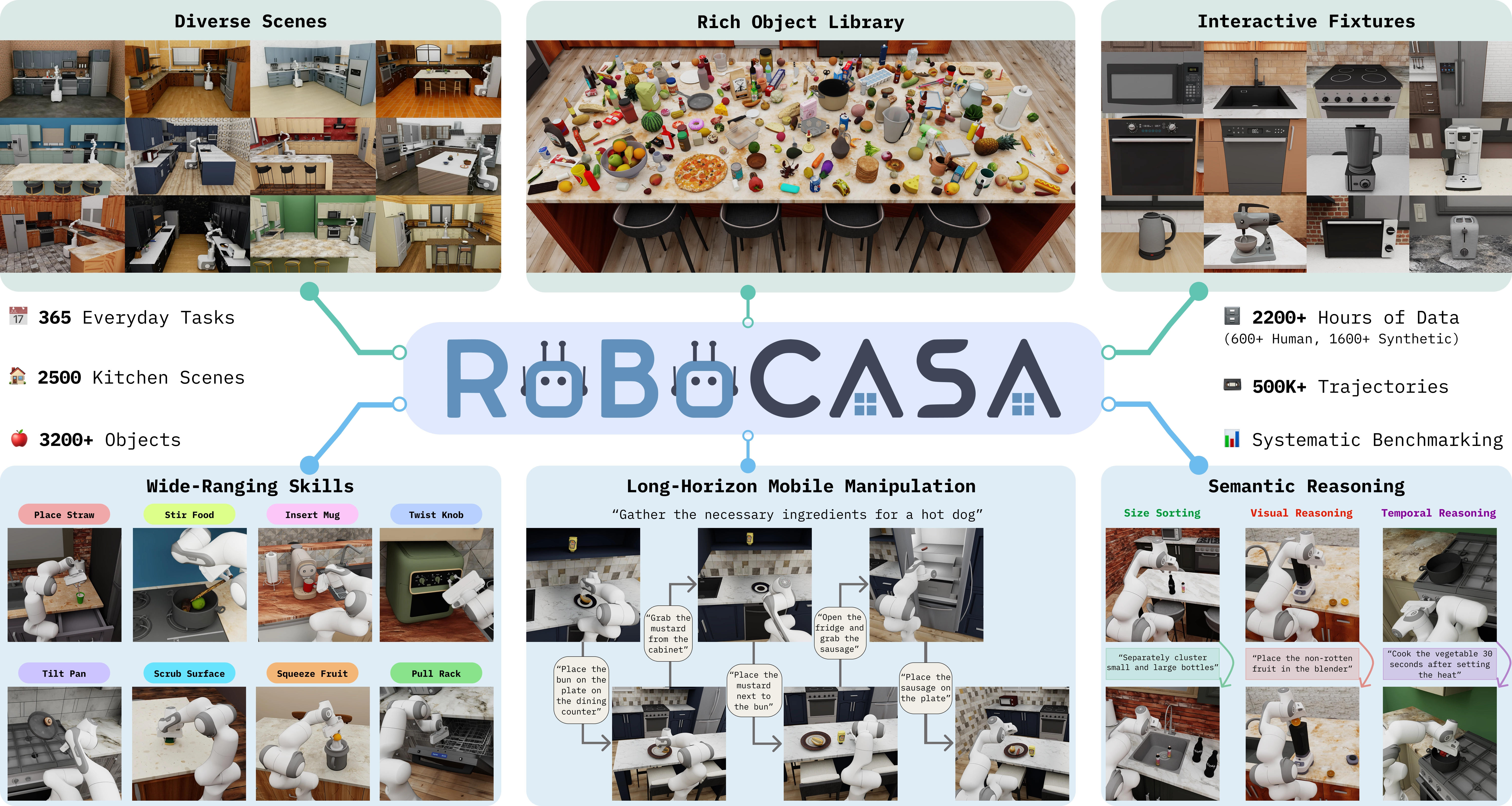
Kitchen scenes, objects, and tasks in RoboCasa365. Source: RoboCasa365 project.#
Run kitchen manipulation tasks with RPent in RoboCasa365, then reproduce Target50 experiments. This integration uses the PandaOmron mobile manipulator and the RLDX-1 action model; its CLI name is robocasa.
Overview#
Check the model, task, and runtime requirements before following the installation and run steps.
RLDX-1
api, claude_code, codex
Target50 kitchen tasks
Linux, NVIDIA GPU; Python 3.10; CUDA and EGL.
Tasks#
Target50 covers the following categories. The reproduction section lists the complete task/seed matrix and run limits.
Category |
Tasks |
Scope |
|---|---|---|
Atomic |
18 |
Individual kitchen operations. |
Composite-Seen |
16 |
Composite tasks in seen categories. |
Composite-Unseen |
16 |
Composite tasks in unseen categories. |
Observation and Action#
The table distinguishes planner tools, model inputs, and the environment’s success criterion.
Item |
Description |
|---|---|
Observation |
Camera views, depth/world coordinates, and mobile-base, end-effector, and gripper state. RLDX-1 receives three camera histories plus state and task text. |
Action |
The planner calls |
Reward / success |
Evaluate success using the environment’s |
Task prompt |
Use the current environment’s complete |
Installation and Resources#
Use Linux, an NVIDIA GPU, working CUDA/EGL, git, and
uv. Create a separate
Python 3.10 environment. If you already have the repository, enter it and start
at the third line:
git clone https://github.com/RLinf/RPent.git
cd RPent
uv venv --python 3.10 .venv-robocasa
source .venv-robocasa/bin/activate
First install a matching CUDA-enabled Torch and torchvision pair for your driver
using the PyTorch instructions
(replace pip with uv pip). RLDX requires Torch >= 2.7 and
torchvision >= 0.22, with mutually compatible versions. Then install RoboCasa:
Environment |
Install |
Assets |
|---|---|---|
RoboCasa365 |
|
|
Dependencies come from pyproject.toml, including the rpent source branches
of RoboCasa, RLDX and Robosuite. Do not also install rlinf-robocasa365, which
provides the same import package.
Check dependencies, download the kitchen assets (~10 GB) outside the Python package directory, and set their path in the shell used to launch RPent:
uv pip check
robocasa-download-assets --assets-path ~/.robocasa/assets --no-macros -y
export ROBOCASA_ASSETS_PATH=~/.robocasa/assets
Target50 does not need dataset or teleoperation setup, so use --no-macros.
Assets include downloaded collections and bundled scene files. Add
--skip-existing when rerunning to check existing downloads. Prepare model
files in the next section.
Optional Dependencies and Version Records
flash-attn is optional; RLDX uses PyTorch SDPA when it is absent. See the
FlashAttention instructions
if you need it.
The reference run used Torch 2.7.0, torchvision 0.22.0 and CUDA 12.6; choose versions compatible with your machine. Source branches can change, so record dependencies and code versions for reproduction:
uv pip freeze > installed-requirements.txt
git rev-parse HEAD > rpent-revision.txt
VLA Configuration#
RLDX-1 needs both fine-tuned weights and base-model support files. Download both below. Model and asset licenses apply separately.
Model Weights#
Download RLDX-1-FT-RC365, the RoboCasa365 fine-tune, and set
--vla-model-path to this directory when running a task:
hf download RLWRLD/RLDX-1-FT-RC365 \
   --revision 587e9ecdcc5e7184fcc17f58713908edff5af041 \
   --local-dir ./checkpoints/rldx-1-ft-rc365
Base-Model Support Files#
The fine-tuned weights also need architecture, image-processing and tokenizer
configuration from RLWRLD/RLDX-1-VLM. This command downloads support files
only; base-model weights are not required:
export HF_HOME="$PWD/.cache/huggingface"
export HF_HUB_CACHE="$HF_HOME/hub"
hf download RLWRLD/RLDX-1-VLM \
   --revision 4b9f870d1287e0d38d7eb1445e6d8c60afe66dd7 \
   --include "*.json" "*.txt" "*.jinja" "*.md" "*.png" ".gitattributes" \
   --exclude "*.safetensors.index.json"
Keep these cache variables in the launch shell and avoid pointing
TRANSFORMERS_CACHE at another empty directory. Ordinary runs, Target50 and
separately started RPent VLA servers automatically use this support revision;
--vla-model-path still selects the fine-tuned weights. The support download
contains 15 configuration, documentation and image files, about 16.4 MB.
Run a Task#
Configure your model service with Planner Configuration and check it using rpent-check-llm. Run OpenDrawer with seed 1:
rpent --robot robocasa \
      --task-name OpenDrawer \
      --split target \
      --seed 1 \
      --vla-model-path ./checkpoints/rldx-1-ft-rc365 \
      --planner claude_code \
      --model claude-opus-4-8
You can also use --planner api or --planner codex; see the planner guide above.
View Results#
Task success comes from the environment’s _check_success() result, exposed as state.success. The planner’s finish status ends its conversation and is not an evaluation label. Inspect result.json, transcript_*.json, and run.log in the output directory; service startup errors are in env_server.log and vla_server.log.
Use --dashboard to watch cameras and planner output; see Interactive Usage for the shared workflow.
Task Memory#
By default, CLI and Dashboard download memory from HF main and provide the current task’s memory (task-specific) and general guidance (global). The planner reads as needed, giving priority to live observations and task instructions.
memory/robocasa/
├── task-specific/
└── global/
Global memory is required. Task JSON and recipe must both exist or both be absent; task Markdown is optional. RPent file tools expose only the memory allowed for the current task.
To evaluate with a fixed local copy, use
--memory-profile local --memory-dir <directory>; download and run commands
are in Experiment Reproduction (Target50). Expand the details below for filenames,
local exploration output and custom sources.
Memory File Selection and Custom Sources
HF mode uses robocasa/ from the dataset’s current main branch. It provides
<Task>_s0.json, <Task>_s0_recipe.jsonl, optional <Task>.md and
global/GLOBAL_MEMORY.md. The evaluation --seed changes the scene;
reference memory still uses _s0.
Local evaluation uses --memory-profile local --memory-dir <directory> and
supports two task file conventions:
Published corpus:
task-specific/<Task>_s0.jsonand<Task>_s0_recipe.jsonl.Exploration output:
task-specific/<Task>_<split>_s0.jsonand<Task>_<split>_s0_recipe.jsonl.
JSON and recipe must both exist or both be absent. If absent, the planner uses
global guidance and live observations. If both conventions exist for the same
task, separate them with different --memory-dir directories. <Task>.md
is optional; its absence is logged.
Local evaluation also exposes global/*.md and task-family/*.md whose
YAML frontmatter matches all of suite: robocasa, regime: <split> and
task_id: <Task>. At least one readable global file is required.
Prompts and RPent file tools share the selected file list. The tools deny
other tasks, other splits, the root MEMORY.md index and _internal/;
this restriction applies only to RPent tools. CLI checks memory before starting
services. Dashboard checks the directory and global layer before starting its
shared VLA, then task files before starting each environment. A task-file error
leaves the shared VLA running.
The planner reads memory as needed. Live task language, RGB-D, progress and
tool results take precedence. Continue VLA calls while contact, a held object
or visible progress persists; after two consecutive calls without contact or
progress, re-ground and make a bounded pose adjustment. Each call uses the
full live task language. Historical vla_act describes strategy; historical
coordinates must not be replayed.
Each run starts a fresh record of selected files, missing layers and actual reads, even when reusing an output directory. Zero or partial reads can produce valid environment results; missing or corrupt audits are reported separately. Results record the profile and task-family identity for boundary checks.
Custom Memory Sources
For another HF dataset with the same layout, set
RPENT_MEMORY_HF_REPO=<owner>/<dataset> and use --memory-profile hf.
The variable takes a repository ID.
For a custom subtree or branch, download into a fresh directory and use local
mode. Add --revision <branch> to select a branch:
hf download <owner>/<dataset> --repo-type dataset \
   --include '<subpath>/**' --local-dir ./custom-memory

# Add to the RPent run command:
# --memory-profile local --memory-dir ./custom-memory/<subpath>
The selected directory should contain task-specific/ and global/ and
meet the file-selection rules above.
Exploration Mode#
Add --explore to let the planner reset, retry and save local memory. The
directory may start empty. Each run allows up to three planner sessions, with
at most five attempts per session by default:
rpent --robot robocasa --task-name OpenDrawer --split target --seed 0 \
  --vla-model-path /path/to/rldx \
  --planner codex --reasoning-effort high --planner-timeout-s 7200 \
  --explore --explore-sessions 3 --explore-attempts-per-session 5 \
  --memory-dir /path/to/robocasa-memory
Drafts: notes go to the current task’s inbox; exploration can read the root
MEMORY.mdindex.Merging: when the run ends normally without an agent execution error, accepted proposals are merged into
task-family/andglobal/, the successful audit/recipe pair goes intotask-specific/, and the index is updated. Use--no-auto-merge-memoryto disable automatic merging.Evaluation: use seed-0 exploration output with
--memory-profile localpointing to the same directory. Global memory must be published first; evaluation exposes only memory for the current task and split.
Experiment Reproduction (Target50)#
Target50 covers 50 kitchen tasks and 340 runs. The example below uses Codex, GPT-5.5 and xhigh with task-specific and global memory.
1. Prepare Memory and Settings#
Complete the installation, resource downloads and Codex login above. Download memory into a fresh directory and keep it unchanged throughout the evaluation:
hf download RLinf/RPent-memory --repo-type dataset \
   --include 'robocasa/**' --local-dir ./target50-memory
Set the action parameters and clear any legacy environment override for --seed:
export RLDX_MAX_CHUNKS=40
export RLDX_SETTLE_PATIENCE=999
export RLDX_ACTION_STEPS_PER_CHUNK=8
unset RLDX_RESET_SEED
2. Run Each Task and Seed#
Start with OpenDrawer at seed 1:
rpent --robot robocasa \
      --task-name OpenDrawer --split target --seed 1 \
      --vla-model-path ./checkpoints/rldx-1-ft-rc365 --cuda-device 0 \
      --planner codex --model gpt-5.5 --reasoning-effort xhigh \
      --max-turns 100 --planner-timeout-s 1800 \
      --memory-profile local \
      --memory-dir ./target50-memory/robocasa \
      --output-dir ./runs/target50/atomic/OpenDrawer_s1
Repeat for every task and seed in the matrix below. Task names are listed in
Full Task List; the manifest is robots/robocasa/eval/target50.json.
Split |
Tasks |
Seed range per task |
Run timeout |
Runs |
|---|---|---|---|---|
Atomic |
18 |
1–10 |
1800 s |
180 |
Composite-Seen |
16 |
1–5 |
3600 s |
80 |
Composite-Unseen |
16 |
1–5 |
3600 s |
80 |
Total |
50 |
340 |
Run Atomic, then Composite-Seen, then Composite-Unseen. For both composite
groups, use --planner-timeout-s 3600 and output directories
composite_seen/<Task>_s<seed> or composite_unseen/<Task>_s<seed> under
./runs/target50/.
Do not reset the environment during evaluation. Keep task failures and planner timeouts as results; retry infrastructure failures only when they produced no valid environment result.
3. Check Results#
Each run saves result.json in its output directory. Success comes from the
environment’s state.success. Check and summarize the results with:
python -m robots.robocasa.eval.validate_target50 ./runs/target50
A complete evaluation reports valid_cells=340 and expected_cells=340,
with no validation errors and exit code 0. Partial evaluations list missing
results and return a nonzero exit code. Overall success weights all 50 tasks
equally.
Published scores are on the leaderboard. Expand the details below for task names, evaluation settings and published scores.
Full Task List
Seen/unseen describes whether tasks occur in the pretraining data; target kitchens form a separate held-out scene split. See the RoboCasa dataset definitions. The tasks split into three groups:
Atomic (18) — single-primitive articulation and pick-place tasks:
CloseBlenderLid,CloseFridge,CloseToasterOvenDoor,CoffeeSetupMug,NavigateKitchen,OpenCabinet,OpenDrawer,OpenStandMixerHead,PickPlaceCounterToCabinet,PickPlaceCounterToStove,PickPlaceDrawerToCounter,PickPlaceSinkToCounter,PickPlaceToasterToCounter,SlideDishwasherRack,TurnOffStove,TurnOnElectricKettle,TurnOnMicrowave,TurnOnSinkFaucet.Composite seen (16) — multi-step tasks represented in the pretraining data:
ScrubCuttingBoard,StackBowlsCabinet,WashLettuce,RinseSinkBasin,PreSoakPan,StirVegetables,LoadDishwasher,SteamInMicrowave,SetUpCuttingStation,GetToastedBread,DeliverStraw,KettleBoiling,PrepareCoffee,StoreLeftoversInBowl,SearingMeat,PackIdenticalLunches.Composite unseen (16) — multi-step tasks absent from the pretraining data:
ArrangeBreadBasket,ArrangeTea,BreadSelection,CategorizeCondiments,CuttingToolSelection,GarnishPancake,GatherTableware,HeatKebabSandwich,MakeIceLemonade,PanTransfer,PortionHotDogs,RecycleBottlesByType,SeparateFreezerRack,WaffleReheat,WashFruitColander,WeighIngredients.
Pass any of these to --task-name. The full RoboCasa catalog is
larger; see the RoboCasa upstream.
Action Settings
The three Target50 settings apply to each RLDX tool call:
Environment variable |
Value |
Meaning |
|---|---|---|
|
40 |
Maximum prediction chunks per call; ordinary RoboCasa uses 70. |
|
999 |
Consecutive chunks with little end-effector and gripper motion before stopping as settled. This exceeds the 40-chunk cap. |
|
8 |
Actions executed from each prediction chunk. |
Evaluation Protocol
The current evaluation uses task-specific and global memory together.
target50.json uses protocol robocasa-harness-vla-v2 and
result schema 1.1, with GPT-5.5 as the reference configuration. Installation
dependencies come from pyproject.toml. For custom tasks, seeds or planner
settings, pass a manifest using the current protocol:
python -m robots.robocasa.eval.validate_target50 /path/to/results \
   --manifest /path/to/manifest.json
For comparisons, keep a copy of the memory and record its HF commit or file
hashes locally, alongside the resolved commits of source dependencies on their
rpent branches. Memory is not version-pinned; the validator does not compare
its contents across runs.
Published Target50 Scores
The leaderboard is the source for the reported rates below. The RPent configurations are Codex / GPT-5.5 / xhigh / reasoning, Codex / GPT-6 Astra / low / reasoning, and Claude Code / Opus-4.7 / max.reasoning. The Harness VLA reference column reports GPT-5.5 results from paper Table 4. Overall weights all 50 tasks equally; it is not the fraction of successful cells among 340.
Split |
RPent / GPT-5.5 |
RPent / GPT-6 Astra |
RPent / Opus-4.7 |
Harness VLA / GPT-5.5 reference |
|---|---|---|---|---|
Atomic-Seen |
92.0% |
87.78% |
79.4% |
92.0% |
Composite-Seen |
61.0% |
43.75% |
47.5% |
61.0% |
Composite-Unseen |
13.8% |
42.50% |
15.0% |
13.8% |
Overall (task-weighted) |
57.1% |
59.20% |
48.6% |
57.1% |
Environment Checks#
Check the simulator first, then VLA inference. Both need working GPU/EGL. Skipped tests are not passes, and these checks do not produce leaderboard scores.
Simulator Check#
Run after installing dependencies and kitchen assets. No planner credentials or model weights are needed:
uv pip install pytest pytest-timeout
RPENT_RUN_ROBOCASA_INTEGRATION=1 \
   pytest tests/integration_tests/robots/robocasa/test_target50_runtime_smoke.py -v
Expect four passes: three tasks (OpenDrawer, NavigateKitchen and
PickPlaceCounterToCabinet at seed 1) plus a mobile-camera check.
Simulator Check Coverage
Task checks cover environment creation/reset, 12D actions, operation cameras, navigation RGB-D/world map, the success predicate and clean shutdown. The camera check verifies pose and image changes after eight base steps. These use the real simulator and run separately from offline CPU unit tests.
VLA Inference Check#
Complete VLA configuration, then select an
available GPU and a fresh output directory. Install .[test] if you need the
test dependencies:
CUDA_VISIBLE_DEVICES=0 \
RLDX_MODEL_PATH="$PWD/checkpoints/rldx-1-ft-rc365" \
RPENT_E2E_OUTPUT_DIR="$PWD/e2e-robocasa" \
HF_HUB_OFFLINE=1 TRANSFORMERS_OFFLINE=1 NO_ALBUMENTATIONS_UPDATE=1 \
MUJOCO_GL=egl python -m pytest -q \
   tests/e2e_tests/robocasa/test_components.py::test_rldx_component --timeout=300
This checks VLA startup, RPC communication and first inference without a planner. Offline variables apply only to this command; normal HF memory sync still needs network access.
Troubleshooting#
Start with the output directory’s logs: env_server.log for environment
startup, vla_server.log for VLA startup, and run.log for task execution.
Downloads and Assets#
Slow or interrupted downloads: set
UV_HTTP_TIMEOUT=600for packages; retry model downloads or use the mirror below. Keep TLS verification enabled and check completeness rather than file size alone.Insufficient disk space: caches and temporary directories need room for ZIP archives and unpacked files, plus existing assets during replacement. The asset filesystem must support hard links.
Missing or conflicting assets: rerun the asset download with
--skip-existingto check files. Use--overwritebelow only when you intend to replace existing files.
Asset Replacement and Model Download Mirror
The asset root needs downloaded collections and bundled scene, arena and fixture files, including attribution files. Conflicting files are preserved by default; to replace them intentionally, run:
robocasa-download-assets --assets-path ~/.robocasa/assets --no-macros --overwrite -y
--overwrite takes precedence over --skip-existing and replaces only
files in the installation scope. Rerun interrupted downloads.
For slow model downloads, use the mirror with the same revision:
HF_ENDPOINT=https://hf-mirror.com hf download RLWRLD/RLDX-1-FT-RC365 \
   --revision 587e9ecdcc5e7184fcc17f58713908edff5af041 \
   --local-dir ./checkpoints/rldx-1-ft-rc365
Startup and Inference#
Missing RLDX interfaces in an old environment: reinstall
.[robocasa]with--reinstall-package rlinf-rldx. Older PyPI wheels can lack required interfaces even with the same version number.Missing navigation camera: if the error names
mobilebase0_navview, reinstall.[robocasa]to update Robosuite rather than patching XML.Directory permission errors: use the source dependencies from
.[robocasa]; XML conversion should write temporary files. SetNUMBA_CACHE_DIRto a writable directory without changing package permissions.CUDA/EGL unavailable: select Torch/torchvision for your machine, then run the environment checks to verify GPU operations and rendering. The driver version alone does not confirm a working setup.
Missing offline model files: check the support files and cache paths.
NO_ALBUMENTATIONS_UPDATE=1only disables an update check; keep image processing and geometry fallback settings unchanged.Proxies interfere with RPC:
127.0.0.1andlocalhostbypass proxies automatically. For other services that need a direct connection, add their exact hostname toNO_PROXYandno_proxy. Keep remote planner proxies.
Memory Reads#
If read_text_file cannot find current-task memory, check
memory/robocasa/task-specific/ or your local directory and the task name.
See memory file selection for naming rules.
Atomic tasks have no published optional <Task>.md; another task’s memory
is never used as a substitute.
Implementation Notes#
See Add a Robot or Simulator for integration guidance. RoboCasa-specific observation and session details are below.
Observations, Sessions and Exploration Details
Environment tools: the toolkit provides actions, state reads and
finish. Grasp checks and action assembly run in the environment service. The skill uses the environment client for rendering/actions and the model client for RLDX-1 inference.Model inputs: three camera video tensors have shape
(1, T, H, W, 3), whereTis the history length, alongsidestate.*andannotation.*.Session isolation:
RpcClientregisters a privaterpc_+ UUID hex ID duringwait_for_ready. The server passes it topredict/reset_sessionto isolate each client’s RLDX memory and RTC state. The ID is outside observations;rldx_skill/vla_clientdo not handle it.Session cleanup: the server periodically removes idle sessions, with a default timeout of 3600 seconds. Clients send
session.closeviaatexit.Exploration prompts:
robots/robocasa/prompts/explore.pycovers mobile base use,task_progress, RLDX continuity and failure notes.resetuses the native episode reset; only the winning commands after the final reset are exported.